
Table of Contents
- Can You Play Puzzles Offline on Kindle? The Short Answer
- How to Download Games on Kindle for Offline Use
- Best Offline Puzzle Games for Kindle Fire
- Offline Puzzles on Kindle Scribe: Write-On Formats That Work
- Sideloading Web Apps and PDF Games for No-Wi-Fi Play
- Battery Consumption and Performance: What Puzzle Play Actually Costs
- Accessibility Features That Make Offline Puzzles More Enjoyable
- Conclusion
Last Updated: August 16, 2026
Can You Play Puzzles Offline on Kindle? The Short Answer
Yes, you can play puzzles offline on Kindle, but it depends entirely on which device you own. At Horsecreek Digital, we hear this question constantly from puzzle fans who want to solve crosswords and word searches without hunting for Wi-Fi.
Puzzles offline on Kindle work in two different ways. E-ink Kindles (Paperwhite, Oasis, and Scribe) support puzzle content delivered as eBooks and PDFs, which you download once and access forever without internet. Kindle Fire tablets run a modified Android system and support full apps from the Amazon Appstore, giving you a wider range of interactive puzzle games for offline play.

E-Ink Kindles vs. Kindle Fire Tablets: Why the Difference Matters
These two device categories share a brand name and almost nothing else.
E-ink Kindles use electronic ink displays optimized for reading with minimal interface. They run a locked-down operating system that doesn't support third-party app installation. What they do support is eBook and PDF content, which means puzzle books formatted for e-readers work beautifully, especially on the Kindle Scribe with its stylus input.

Kindle Fire tablets use LCD touchscreens and run Fire OS, built on Android. They support apps from the Amazon Appstore, including many puzzle and word game apps designed for touchscreen use with smooth performance for casual puzzle apps.
The practical takeaway: if you own a Kindle Paperwhite or Scribe, your offline puzzle experience comes from eBooks and PDFs. If you own a Kindle Fire, you can download dedicated puzzle apps. Both work well offline once content is downloaded.
| Device Type | Puzzle Format | App Support | Offline Mode | Stylus Input |
|---|---|---|---|---|
| Kindle Scribe | eBook / PDF | No | Yes | Yes |
| Kindle Paperwhite | eBook / PDF | No | Yes | No |
| Kindle Fire | Apps + eBooks | Yes | Yes (downloaded) | No (most models) |
How to Download Games on Kindle for Offline Use
The biggest mistake people make is assuming content is automatically available without Wi-Fi. You need to deliberately download content to local storage before going offline.
Step 1: Find a Compatible Puzzle App or eBook
For Kindle Fire, open the Amazon Appstore and search for puzzle games. Look for apps that explicitly mention offline mode in their description, since some require a constant connection.
For e-ink Kindles and the Kindle Scribe, search the Kindle Store for puzzle eBooks formatted for e-readers. PDF puzzle books also work well, particularly on the Scribe where stylus input lets you write answers directly.
Step 2: Download While Connected, Play Anywhere
Purchasing content does not automatically download it to your device.
On a Kindle Fire: go to your app library, find the puzzle app, and tap the download icon. Inside the app, look for a "download for offline" option in settings to pre-load puzzle packs.
On an e-ink Kindle: after purchasing a puzzle eBook, open your library, find the title, and tap to download it. Once downloaded, the book is available offline indefinitely.
Step 3: Manage Storage So Games Stay Available
Storage management matters because puzzle apps can consume significant space.
- Check available storage under Settings > Storage before a trip
- Delete apps or content you've finished to free space
- PDF games are compact; a full puzzle book rarely exceeds 20 MB
- On Kindle Fire, puzzle apps can run 200-500 MB each
Best Offline Puzzle Games for Kindle Fire
Kindle Fire's app support offers a strong selection of offline puzzle content with smooth touchscreen responsiveness.
Word Games and Crossword Puzzles
Word games are the strongest category for offline Kindle Fire play. Many crossword and word search apps allow you to download puzzle packs in advance, giving you hundreds of digital puzzles without a connection. The crossword experience on Kindle Fire is solid for casual solvers, with quick navigation between clues and progress bookmarking. According to Amazon's Appstore developer guidelines, apps distributed through the Appstore must function in offline mode if they advertise that capability.

Educational word game apps designed for learning often have strong offline modes since they're marketed to schools and parents without guaranteed Wi-Fi access.
Logic and Code-Breaking Puzzles
Logic puzzles and code-breaking games are a strong fit for tablets. These apps typically store puzzle data locally since puzzles are small text files. Progress syncing happens through cloud saves when you reconnect, but puzzles play fine offline.
Offline Puzzles on Kindle Scribe: Write-On Formats That Work
The Kindle Scribe changes the offline puzzle conversation entirely. Puzzle eBooks formatted for the Scribe work completely offline after a single download. The e-ink display is easy on the eyes during long sessions, and battery consumption is dramatically lower than tablets, which matters for travelers.
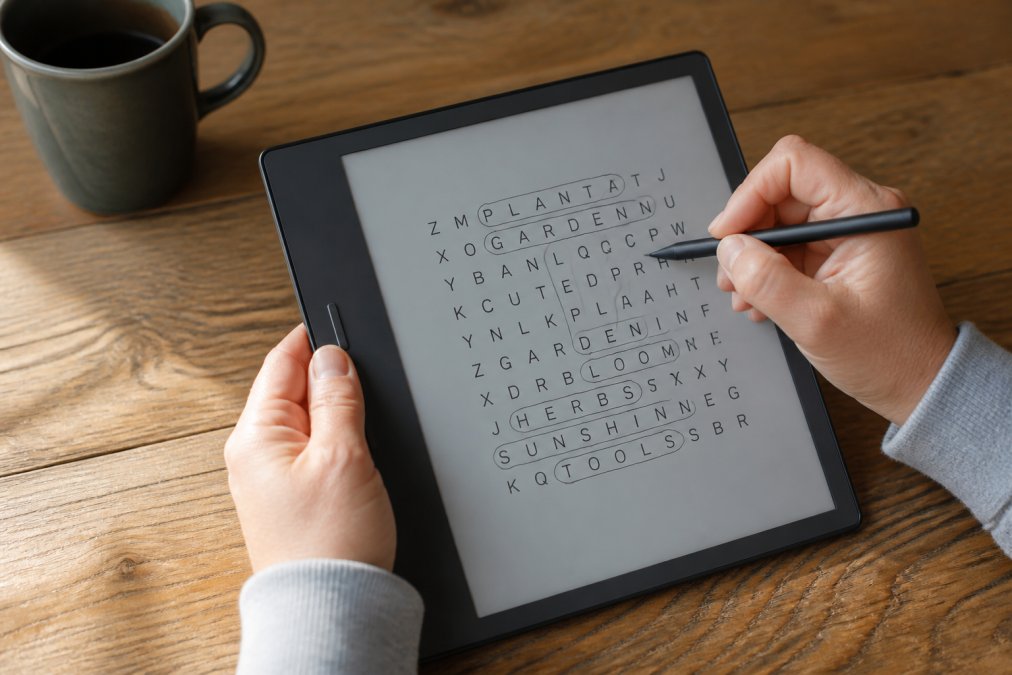
Horsecreek Digital's write-on puzzle editions are built specifically for this use case. Titles like the Kindle SCRIBE edition: Lights, Camera, Oscar Crossword Puzzle at $3.99 and the Challenging Word Search Puzzle Book for Kindle Scribe at $2.99 let you write directly on the puzzle page with the stylus, no app or internet required.

How Stylus Input Changes the Puzzle Experience
Stylus input on the Scribe converts skeptics. Writing answers with the stylus feels closer to pen on paper than touchscreen tapping. The e-ink display has natural friction, and latency is low enough that it doesn't interrupt thinking.
For crossword puzzles, you write letters directly into grid cells. For word searches, you circle words by drawing. The experience is tactile in a way glass screens aren't. Readers who've used physical puzzle books consistently report the Scribe feels like a natural transition rather than a compromise.
PDF games also work well on the Scribe. You can sideload PDF puzzle books and annotate directly on the page.
Sideloading Web Apps and PDF Games for No-Wi-Fi Play
Sideloading is the process of installing content onto your Kindle outside the official store, significantly expanding offline puzzle possibilities.
According to Amazon's official Kindle device help pages, Kindle Fire supports app installation from outside the Appstore by enabling "Apps from Unknown Sources" in security settings. E-ink Kindles don't support app sideloading but do support sideloading PDFs and eBook formats via USB or email.
Step-by-Step: Sideloading a Web App or PDF Puzzle onto Kindle
For Kindle Fire (app sideloading):
- Go to Settings > Security and enable "Apps from Unknown Sources"
- Download an APK file from a reputable source
- Open the downloaded file using the file manager
- Tap "Install" and follow prompts
- Download any puzzle packs for offline mode before disconnecting
For Kindle Scribe or e-ink Kindles (PDF sideloading):
- Connect your Kindle to a computer via USB cable
- Navigate to the "Documents" folder
- Drag and drop PDF puzzle files into Documents
- Eject safely and disconnect
- PDFs appear in your library immediately, no Wi-Fi required
Battery Consumption and Performance: What Puzzle Play Actually Costs
Battery consumption matters enormously for travel.
E-ink Kindles win decisively. The e-ink display only draws power when the screen refreshes, so reading or writing on a static puzzle page uses almost no battery. A Kindle Scribe can last weeks on a single charge during normal puzzle use.
Kindle Fire tablets use LCD displays that draw constant power. Active puzzle app use drains the battery at a rate comparable to any Android tablet, expect four to eight hours of active play on a full charge. As documented by the U.S. Department of Energy's consumer electronics energy guidance, screen type is the single largest factor in portable device battery consumption.
For Kindle Fire, practical battery tips:
- Reduce screen brightness to 40-50%
- Disable Wi-Fi and Bluetooth when playing offline
- Close background apps before starting
- Avoid puzzle apps with constant animations
Accessibility Features That Make Offline Puzzles More Enjoyable
Accessibility features make the difference between enjoyable and frustrating puzzle experiences.
For e-ink Kindles and the Scribe:
- Font size adjustment for all eBook content
- Bold text mode for improved contrast
- Adjustable lighting to reduce eye strain
- Stylus precision for fine motor control
For Kindle Fire:
- Large text mode system-wide
- High contrast mode for low vision users
- Text-to-speech for voice-over features in some apps
- Adjustable touch sensitivity
The Web Content Accessibility Guidelines published by the W3C define standards that well-designed puzzle apps should meet, including sufficient color contrast and scalable text. When evaluating puzzle apps, checking for basic accessibility standards is useful.
Horsecreek Digital's puzzle books use large, clear formatting for comfortable reading on e-ink screens. The Gone Fishing: A Word Search Adventure and the Hard Code Word Puzzles for Kindle Scribe feature bold, legible layouts for readers who prefer larger print.
| Feature | Kindle Scribe | Kindle Fire | Best For |
|---|---|---|---|
| Font size adjustment | Yes (eBooks) | Yes (system-wide) | Low vision readers |
| Stylus writing | Yes | No | Fine motor preference |
| Voice-over / TTS | Limited | App-dependent | Auditory learners |
| High contrast mode | Yes | Yes | Low vision readers |
| Large print puzzle books | Yes (eBook format) | Yes (eBook + apps) | All accessibility needs |
Frequently Asked Questions
Do Kindle Fire tablets require internet to play games?
Kindle Fire tablets do not require internet once a game is downloaded. Most puzzle apps on the Amazon Appstore include a full offline mode. You download the app while connected to Wi-Fi, and after that the game runs entirely from local storage. Some apps sync progress to the cloud when you reconnect, but the core gameplay works without any internet connection. Just make sure automatic app updates are not set to run on mobile data, which can interrupt offline sessions unexpectedly.
Does the Kindle Scribe support offline puzzle apps?
The Kindle Scribe runs on e-ink hardware with firmware limitations that prevent standard app installation. It does not have access to the Amazon Appstore the way Kindle Fire tablets do. However, the Scribe excels at offline puzzles through a different route: puzzle eBooks formatted for write-on use with the stylus. Titles designed specifically for Kindle Scribe, like those from Horsecreek Digital, download fully to the device and work completely offline, making them ideal for travel and no-Wi-Fi situations.
How do I manage offline game storage on my Kindle Fire?
Open Settings, then go to Storage to see how much space each app and download is using. Delete puzzle apps you have finished to free room for new ones. If your Kindle Fire supports a microSD card, move downloaded content there to expand available space. For puzzle eBooks, the Kindle app's library shows which titles are stored on-device versus in the cloud. Tap and hold a title to download it locally before a trip. Most puzzle eBooks are small files, typically under 50 MB, so storage rarely becomes a serious problem.
Can I play puzzles offline on Kindle when I travel?
Yes, and this is one of the strongest use cases for both Kindle Fire and Kindle Scribe. Download your puzzle apps or eBooks before you leave home while on Wi-Fi. On Kindle Fire, downloaded apps run fully offline. On Kindle Scribe, write-on puzzle eBooks like the Horsecreek Digital crossword and word search titles work without any connection. The e-ink display also means battery consumption stays low during travel, giving you hours of puzzle play on a single charge compared to a standard tablet.
Last Updated: August 16, 2026
Puzzle enthusiasts who travel deserve content that actually works when they're offline, and the right device choice makes all the difference. Horsecreek Digital's write-on puzzle editions for Kindle Scribe are designed for exactly this scenario: download once, play anywhere, with no app required and no Wi-Fi needed. Browse the collection and add a title that fits your puzzle style today.
This article was written using GrandRanker
0 comments