
Table of Contents
- What Makes a Digital Word Search for Kindle Scribe Different
- Best Interactive Puzzle Books for Kindle Scribe
- How to Download and Open Word Search Files on Kindle Scribe
- Difficulty Levels, Themes, and Accessibility Features
- How to Create a Word Search for Kindle Scribe
- Word Search Kindle Scribe vs. Paper Puzzle Books: Is Digital Worth It?
- Conclusion
Last Updated: August 15, 2026
What Makes a Digital Word Search for Kindle Scribe Different
A digital word search for Kindle Scribe is not simply a PDF puzzle dropped onto an e-reader. It is a purpose-built interactive experience that takes full advantage of the Scribe's write-on capabilities, turning what was once a passive reading device into an active puzzle companion. At Horsecreek Digital, we design every puzzle specifically for this format, and the difference between a Scribe-optimized file and a generic PDF is immediately obvious the moment you pick up the stylus.

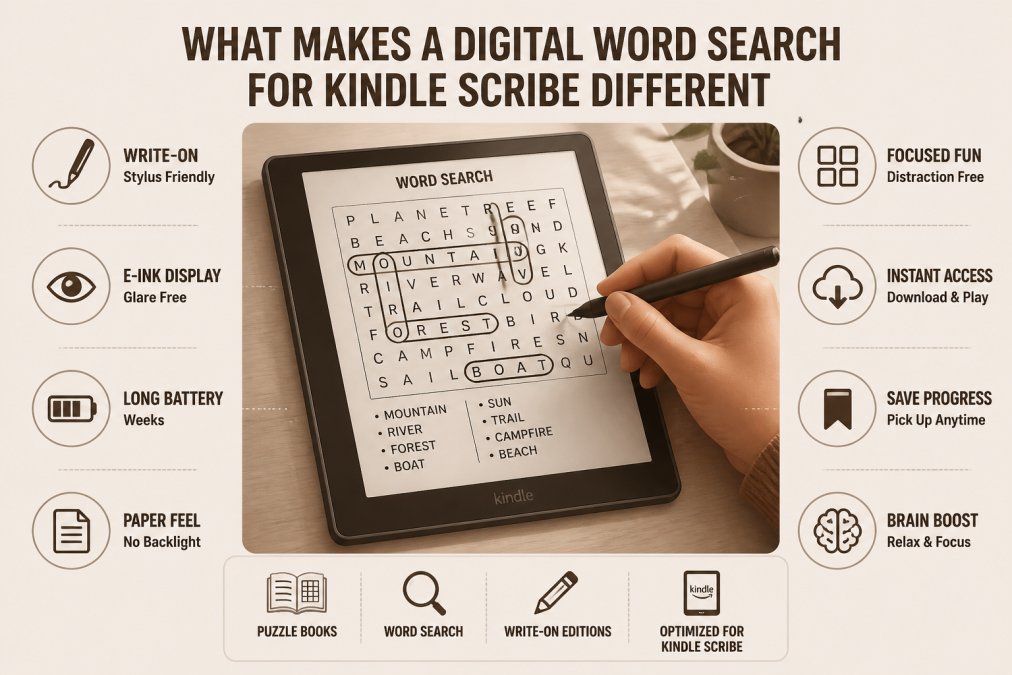
The Kindle Scribe adds a pressure-sensitive stylus layer to an e-ink display, allowing you to write, circle, and annotate directly on the screen. You are drawing circles around words the same way you would with a pen on paper, except your entire puzzle library fits in a single lightweight device. Grid layout matters significantly, Scribe-optimized grids use generous cell sizing and clean, high-contrast typography so circling a word feels deliberate and satisfying rather than fiddly.
How the E-Ink Display and Stylus Work Together
The Kindle Scribe uses an e-ink display that renders text using physical ink particles rather than backlit pixels, producing a reading surface that looks remarkably close to printed paper with none of the eye strain of LCD screens. According to Amazon's Kindle Scribe product documentation, the device features a 10.2-inch, 300 ppi display, giving puzzle grids sharp letter definition at a comfortable working size.
The stylus communicates through electromagnetic resonance, detecting the pen's position without requiring direct electrical contact. Grids formatted at the correct resolution appear crisp and fully legible without zooming, and the 10.2-inch screen is large enough to show a complete puzzle grid without scrolling mid-solve.
Stylus Latency, Tactile Feedback, and the Pen-on-Paper Feel
Stylus latency on e-ink displays is measurably higher than on tablets like an iPad, the Scribe typically registers a stroke within 20-30 milliseconds. However, the tactile feedback is where the Scribe genuinely wins. The matte screen surface creates friction under the stylus tip that mimics the drag of a ballpoint pen on paper, making it feel closer to writing on paper than any other digital device currently available.
Best Interactive Puzzle Books for Kindle Scribe
The Horsecreek Digital catalog covers many themes, puzzle counts, and difficulty levels. Every title is formatted exclusively for the Kindle Scribe write-on experience and is not compatible with standard Kindle e-readers.
Quick Picks:
- Best Value: Challenging Word Search (80 puzzles, $2.99)
- Best for Nostalgia: Born in 1960 (100 puzzles, $3.99)
- Biggest Collection: Abraham Lincoln or Shipwrecks (120-150 puzzles, $3.99-$4.99)
- Best Theme-Specific: Gone Fishing ($2.99)
Challenging Word Search - 80 Brain Training Puzzles ($2.99)
The Challenging Word Search Puzzle Book at $2.99 is the best entry point into the Horsecreek Digital catalog. Eighty puzzles spanning nature, travel, history, animals, food, and pop culture provide variety without getting stuck in a single theme. Grids are clean and spacious, sized specifically for comfortable stylus circling. This is the right pick if you want a multi-topic digital activity book at the most affordable price point before investing in larger themed collections.

Nostalgic Decade Collections - Born in 1935 and Born in 1960
The Born in 1935 Word Search ($4.99) features 1,200 carefully selected terms tied to the 1930s era: Hollywood glamour, New Deal politics, swing music, and cultural touchstones. The Born in 1960 Word Search ($3.99) offers 100 puzzles with over 1,600 era terms covering Sixties music, movies, slang, fashion, and politics. Both work as thoughtful birthday gifts, pairing a Kindle Scribe with a puzzle book tied to someone's birth year adds personal meaning that generic digital content cannot replicate.

Theme-Driven Adventures - Shipwrecks, Fishing, Abraham Lincoln, and More
The Shipwrecks and Sunken Treasures Word Search ($3.99) features 150 puzzles built around maritime history and ocean legends. The Abraham Lincoln Word Search ($4.99) offers 120 puzzles covering Lincoln's life, presidency, and Civil War history. The Gone Fishing Word Search Adventure ($2.99) provides 50 fishing-themed puzzles. The Brazil Word Search ($4.50) offers 100 puzzles spanning culture, wildlife, cities, and landmarks.
| Title | Puzzles | Price | Best For |
|---|---|---|---|
| Challenging Word Search | 80 | $2.99 | Variety seekers, first-time buyers |
| Born in 1935 | 1,200 terms | $4.99 | 1930s history fans |
| Born in 1960 | 100 | $3.99 | Baby boomers, milestone birthdays |
| Shipwrecks & Sunken Treasures | 150 | $3.99 | Maritime history enthusiasts |
| Abraham Lincoln | 120 | $4.99 | History enthusiasts, educators |
| Gone Fishing | 50 | $2.99 | Outdoor and fishing enthusiasts |
| Brazil Word Search | 100 | $4.50 | Travel lovers, cultural explorers |
How to Download and Open Word Search Files on Kindle Scribe
Getting a digital word search onto your Kindle Scribe is straightforward. Most Horsecreek Digital titles are delivered as optimized PDF files, which the Scribe handles natively.
Side-Loading PDF Files via Send to Kindle
The simplest method is Amazon's Send to Kindle service:
- Purchase and download your puzzle PDF to your computer or phone.
- Visit Amazon's Send to Kindle web tool and sign in with your Amazon account.
- Upload the PDF file using the web interface.
- Select your Kindle Scribe as the destination device.
- Confirm the transfer. The file will appear in your Scribe's library within a few minutes.
- Open the file from your library and tap the pen tool icon to switch into annotation mode.
Alternatively, connect your Kindle Scribe to a computer via USB cable and copy the PDF directly into the Documents folder. Disconnect and the file appears in your library immediately.
Offline Use, Storage Capacity, and Battery Life Impact
Once a PDF is on your Scribe, it requires no network connection to open or use. You can solve puzzles on a plane or anywhere else without Wi-Fi. Storage capacity is generous, a typical Horsecreek Digital word search PDF runs between 5 and 15 megabytes, meaning you could carry hundreds of puzzle books simultaneously.
E-ink displays consume power only when the screen refreshes, so passive reading uses very little energy. Active stylus annotation triggers more frequent refreshes and moderately higher battery consumption. According to Kindle Scribe battery life specifications, the device is rated for weeks of reading use. Active annotation will reduce that figure, but most users find a single charge lasts through many hours of puzzle solving.
Difficulty Levels, Themes, and Accessibility Features
The Horsecreek Digital collection covers a spectrum of difficulty, from straightforward themed finds to genuinely challenging grids where words run diagonally and backwards. Casual puzzlers tend to prefer grids where words run horizontally and vertically only. Experienced puzzlers expect diagonal and reverse entries. The Challenging Word Search collection mixes both approaches within a single book, making it suitable for households where different family members have different skill levels.
Large-Print Grids and Bold Formatting for Easier Reading
The 10.2-inch e-ink display at 300 ppi renders letter grids with exceptional sharpness. Horsecreek Digital formats its grids with generous cell spacing and bold, high-contrast lettering to take advantage of this. A well-formatted puzzle grid shows each letter at a size comparable to large-print paperback text, typically around 14-16 point equivalent. No zooming is required during solving, which means your stylus hand stays in position.
For users with visual impairment, the Scribe's built-in accessibility settings allow display brightness adjustment and font size scaling. High-contrast black-on-white grid designs align with Web Content Accessibility Guidelines from W3C for maximum legibility.
How to Create a Word Search for Kindle Scribe
Creating your own puzzle content for the Kindle Scribe is accessible. The core requirement is producing a PDF formatted to the Scribe's display dimensions and resolution.
Formatting and Optimizing Your PDF for the E-Ink Display
The Kindle Scribe display is 10.2 inches diagonal with a 1860 x 2480 pixel resolution. Set your document to approximately 7.8 x 10.4 inches at 300 dpi. Key formatting principles:
- Use a minimum 14pt font for grid letters to ensure legibility without zooming.
- Set cell padding generously, at least 2mm around each letter, to give the stylus room to circle without overlapping adjacent cells.
- Use pure black (#000000) for letters and grid lines on a white background. E-ink displays handle high-contrast content best.
- Keep margins at a minimum of 10mm on all sides to prevent content from sitting too close to the bezel.
- Export as PDF/A if possible to ensure consistent rendering across firmware versions.
Word search grid generators produce the letter matrix; import that into a page layout tool to apply formatting and export the final PDF.
Troubleshooting Sync Issues When Side-Loading External Files
File does not appear in library after USB transfer: Ensure the file is in the root Documents folder, not a subfolder. Restart the Scribe if it does not appear within 30 seconds of disconnecting.
File appears but annotations do not save: This usually indicates the PDF was opened in reading mode rather than document annotation mode. Long-press the file in your library and select "Open in Notebook."
Send to Kindle upload fails or stalls: Check that the file size is under 200MB. If the upload stalls, try the USB method instead.
Annotations disappear after a firmware update: Before updating firmware, back up your annotated PDFs by connecting via USB and copying the files from the Documents folder to your computer.
Word Search Kindle Scribe vs. Paper Puzzle Books: Is Digital Worth It?
Paper books have real advantages: zero setup, no charging, and a tactile experience that the Scribe approximates but does not fully replicate. The digital word search for Kindle Scribe wins on almost every other dimension. A single device holds hundreds of puzzle books. You never need a pen, never run out of eraser space, and can undo a wrong circle instantly. For travelers, the weight difference alone is compelling, the Scribe weighs around 433 grams and replaces an entire bag of puzzle books.
Cost is where the comparison gets interesting. The Challenging Word Search at $2.99 for 80 puzzles works out to roughly four cents per puzzle, difficult to match at a bookstore. The one scenario where paper genuinely wins: sharing. A physical book passes between family members easily. A Kindle Scribe puzzle is tied to the device.
The cognitive benefits of word search puzzles are well-documented regardless of format. Research cited by Harvard Health Publishing on brain exercises supports regular word puzzle activity as a component of cognitive engagement for adults. Whether you prefer paper or digital, the mental exercise value is equivalent. The format choice comes down to convenience, cost, and the tactile experience you prefer.
Finding quality interactive puzzle books for Kindle Scribe that are genuinely formatted for the write-on experience, rather than just converted print files, remains harder than it should be. Horsecreek Digital solves that directly: every title in the catalog is built from the ground up for the Scribe's e-ink display and stylus input, with spacious grids, high-contrast formatting, and puzzle counts that give you real value for the price. Browse the full collection at Horsecreek Digital and add your first digital word search for Kindle Scribe to your library today.
Frequently Asked Questions
Can I use a stylus to do word searches on Kindle Scribe?
Yes. The Kindle Scribe is designed for stylus input, so you can circle, underline, and mark words directly on the puzzle grid just as you would with a pen on paper. Books formatted specifically for the Kindle Scribe, like those from Horsecreek Digital, use spacious grids sized for comfortable stylus use on the e-ink display, so there is no need to zoom or scroll mid-puzzle.
Are interactive PDF word searches compatible with Kindle Scribe?
PDF files optimized for the Kindle Scribe's screen size and resolution work well on the device. You can side-load them using Amazon's Send to Kindle tool, which converts and delivers the file to your digital library. For the best experience, choose files specifically formatted for the Kindle Scribe's e-ink display rather than generic PDFs designed for print or standard screens.
How do I download and open puzzle books on my Kindle Scribe?
After purchasing a digital puzzle book, you can deliver it to your Kindle Scribe via the Send to Kindle email address linked to your Amazon account, or through the Send to Kindle desktop or web app. Once transferred, the file appears in your digital library. Open it, pick up your stylus, and start solving. No internet connection is needed once the file is on the device.
Can I create my own word search puzzles for Kindle Scribe?
You can build custom word searches using free or paid puzzle-generator tools online, then export the result as a PDF. The key is formatting the grid at the correct page dimensions for the Kindle Scribe display and using a high-contrast, clean font. Once the PDF is ready, side-load it using Send to Kindle. Keep grid lines bold and cell sizes generous so the stylus can mark words without crowding.
Will Kindle Scribe word search puzzles work offline, and how much storage do they use?
Once a puzzle book is downloaded to your Kindle Scribe, it works completely offline, no Wi-Fi required. Most formatted puzzle PDFs are between 5 MB and 30 MB depending on puzzle count, so even a library of 20 books uses well under 1 GB of storage. Active puzzle solving with the stylus has minimal impact on battery life compared to streaming or browsing.
This article was written using GrandRanker
0 comments